hero_mobile (4)

Scan & Identify

Quickly turn card images into online inventory by identifying cards, organizing uploads into batches, and reducing manual data entry.


Process Inventory Faster

Scan & Identify is built for sellers who process a lot of cards and want faster, browser-based, and batch-friendly inventory creation. Instead of manually entering cards one at a time, you can upload images in bulk, quickly review and correct matches before inventory goes live, and add cards directly to your inventory in just a few clicks.

With Live Scan (new feature in open beta), you can scan cards directly into Scan & Identify for real-time identification, faster inventory creation, and a smoother workflow — no image imports or feeder scanner required. (Available exclusively to TCGplayer Pro sellers.)

Now available to all Level 4 sellers, Scan & Identify helps simplify inventory management and save time when processing cards.

How Scan & Identify Works

Step 1: Add Scans

Live Scan (Feature Exclusive to TCGplayer Pro)
TCGplayer Pro sellers can scan card images directly into Scan & Identify with Live Scan for a faster workflow, no separate scanner or imported image files required. Live Scan is currently in open beta. 

Import (Standard Scan & Identify)
Import images of your cards using a compatible scanner or image files already saved to your computer.

Step 2: Automatically Identify Cards

Scan & Identify matches your images to the TCGplayer Catalog using Roca Vision technology.

Step 3: Review & Verify Matches

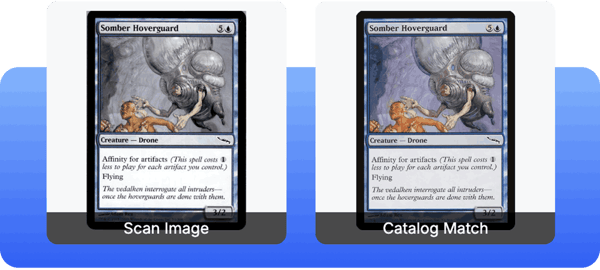
Compare your scan with the matched catalog image, hover over the image to enlarge and review details, and confirm the correct card before adding it to inventory.

Step 4: Add Cards to Inventory

Once reviewed, cards can be added directly to your TCGplayer inventory individually or in batches.

Comparison of a scanned trading card image and its matched TCGplayer catalog image displayed side by side.


Accurate Card Identification 

Powered by Roca Vision technology, Scan & Identify has processed more than 700 million cards with over 98% accuracy.

View card details like set code, card number, and set symbol while reviewing matches side by side.

Eligibility

TCGplayer Pro Sellers

Scan & Identify is available to all TCGplayer Pro sellers. Pro sellers also receive access to the new Live Scan open beta for direct image capture within Scan & Identify.

Level 4 Sellers

Scan & Identify is available to all Level 4 sellers.
The new Live Scan open beta is not included with Level 4 access –– sign up for TCGplayer Pro to get access to Live Scan.

Levels 1-3 Sellers

Explore the requirements to reach Level 4 and unlock access to Scan & Identify. You can also access Scan & Identify through the purchase of a Roca Sifter.

Frequently Asked Questions

What is Scan & Identify?
  • Scan & Identify is a tool that helps you quickly:
    • Import cards for automatic identification and matching to the TCGplayer Catalog.
    • Find new matches if the system incorrectly identified the scan.
    • Create inventory items that can be pushed directly to either staged inventory or live listings.
How do I start using Scan & Identify?
  • TCGplayer Pro Sellers: You already have access to Scan & Identify, including the Live Scan open beta feature to scan cards — no opt-in required. Check out How To Use Scan & Identify to get started.
  • Level 4 Sellers: You already have access to Scan & Identify — no opt-in required. Check out How To Use Scan & Identify to get started. The Live Scan open beta is not included with Level 4 access –– sign up for TCGplayer Pro to get access to Live Scan.
  • Level 1-3 Sellers: Review the requirements to reach Level 4 and unlock access to Scan & Identify. You can access Scan & Identify faster by purchasing a Roca Sifter.
Can I scan cards directly into Scan & Identify?
  • TCGplayer Pro sellers can use the Live Scan feature (currently in open beta) to directly scan images into Scan & Identify using an attached camera. Once it becomes available, all sellers with a Roca Sifter will be able to scan directly to Scan & Identify.
  • Sellers without access to either of these technologies will need a scanner or image scanning application to capture images that can be imported to Scan & Identify. We recommend using the QuickScan application (available on iOS or Google Play Store), the Ricoh fi-8170, or any similar automatic document feed (ADF) scanner.
How do I import scans into Scan & Identify?
  • Select the “Add scans” button and select “Import."
  • Add one or more image files or one Roca Sorter CSV.
  • Indicate printing and condition for the cards in the import.
What product lines does Scan & Identify support?

Currently, Scan & Identify supports Magic: The Gathering, Pokémon, Yu-Gi-Oh!, One Piece, and Disney Lorcana cards.

Start Using Scan & Identify


For more information, see our
Frequently Asked Questions.